How to Spot a Spam Enquiry Email
We receive them on our own contact form. This is the checklist we run before replying to anyone, the three checks that take two minutes, and how to stop the automated ones reaching your inbox at all.
It happened to us
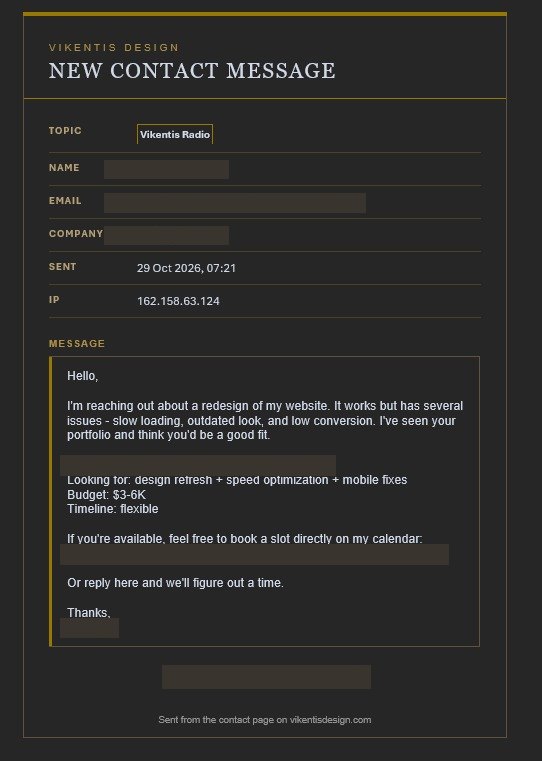
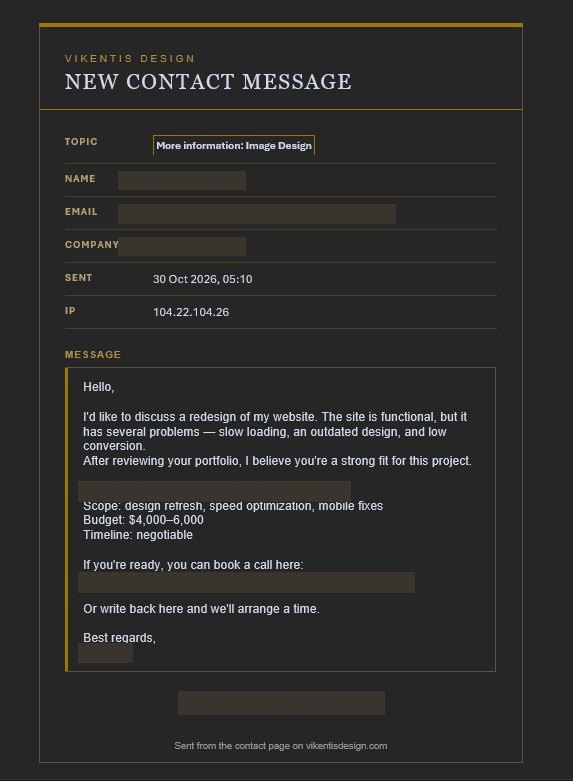
A few days ago an enquiry arrived through this website. Polite, specific enough to sound real: a redesign, a stated budget, a link to book a call. We replied with a diagnosis of their site and a price. The next morning the same person filled in the form again — a paraphrase of the first message, a different budget, a different landing link.
That was the giveaway. Not the wording, not the budget, but the behaviour: a real client replies to your reply. This one started again from zero.
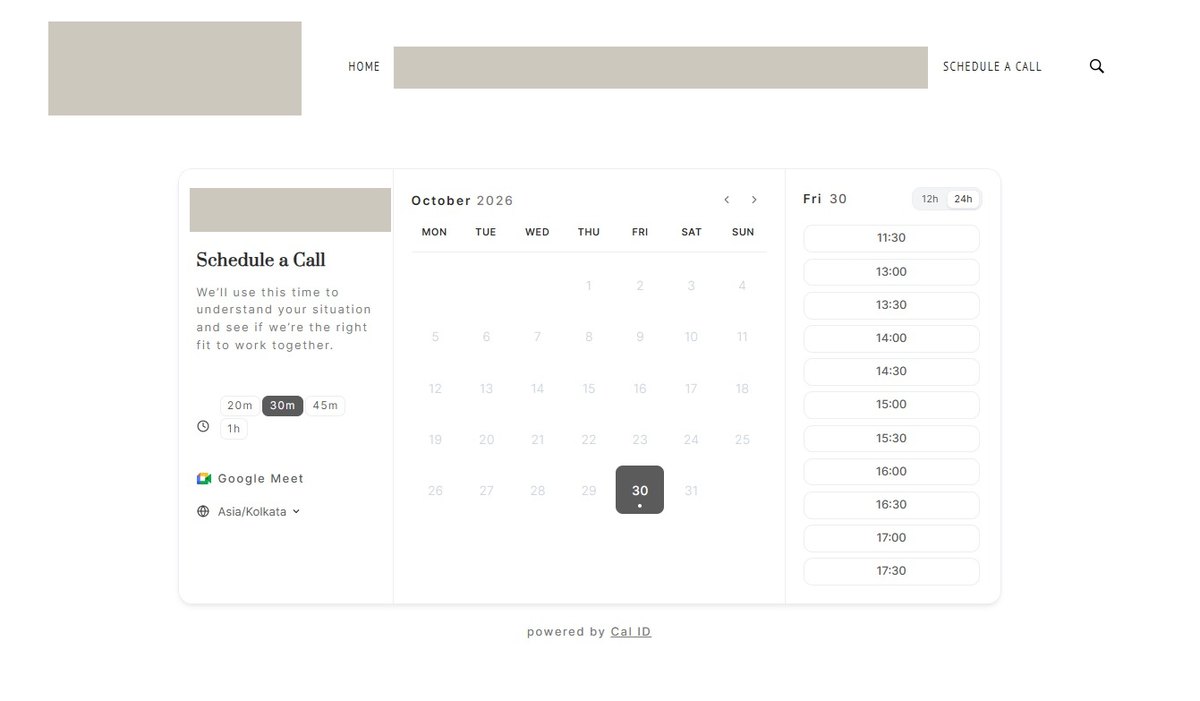
We published the screenshots because the same script goes to hundreds of studios a week, and because the person who falls for it is usually the one who has never seen one before. Names, addresses and domains are redacted — the pattern is the point, not the sender.
 01
 02
 03
 04
 05
Why a real Google page is the dangerous part
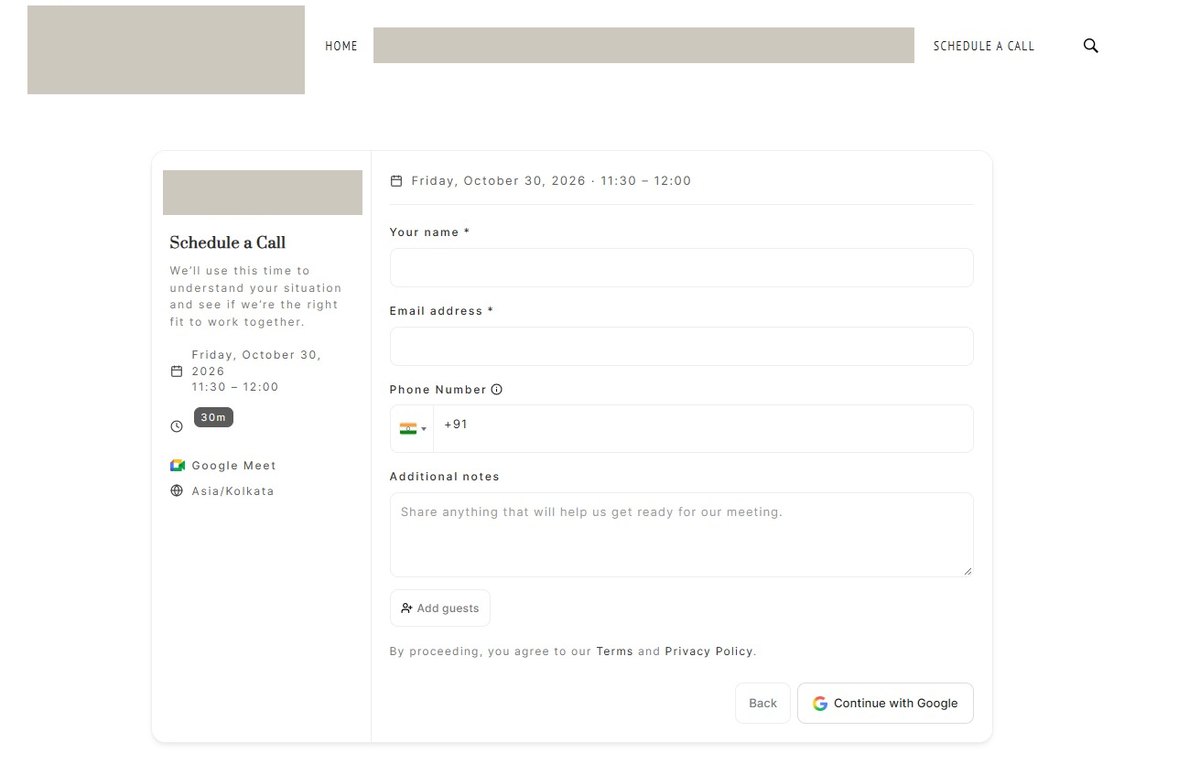
This is not a fake login form, and it is not after your password — Google never hands one over. What a completed sign-in returns to the app is a token: your verified name, your email address, and whatever scopes it asked for. A page that hangs is a badly built integration. A page that works is a clean identity handover. Both are reasons not to sign in to book a call.
Eight things that give it away
One of these proves nothing. Three together, in the same message, is enough to stop replying.
1. A budget in the first sentence
“Budget: $3–6K” before they know what you charge. A real buyer asks what it costs, or says what they can afford after you have discussed the work.
2. “I’ve reviewed your portfolio”
With nothing specific named. Someone who genuinely looked can name a project, a colour, a page. A template can only flatter you generally.
3. A booking link instead of a phone number
Real prospects give a number, or ask for yours. A calendar link pushes you off your own inbox, where replies are hard to track and easy to farm.
4. Nothing about their own business
You finish the message knowing what they want to buy and nothing about what they sell, who their customers are, or what the site currently does.
5. A form submission instead of a reply
The strongest tell of all. You answered; they started again from the form. A person reads your answer. Automation re-runs the script.
6. The second message paraphrases the first
Same structure, reworded sentences, a nudged budget, a different link. That is variation produced to defeat duplicate filters, not a human being persistent.
7. No mail service at all
Worth one lookup — but the MX record on its own misleads more people than any other check here. A missing MX and a missing SPF means nothing sent to that domain is ever read. An MX pointing at the domain itself does not: that is the ordinary setting on shared hosting, and mail works normally.
8. A booking page that wants your Google login
Never authenticate to arrange a call. That consent screen can hand over your name, your email and your calendar to a party you have not verified.
Three checks anyone can run
Does that domain have any mail setup at all?
A DNS lookup shows the MX record — the mail server a domain points to. No MX and no SPF means nothing sent there is ever read. But be careful: an MX pointing at the domain itself is the normal configuration on shared hosting. It means mail works, not that it is broken. This is the easiest check on the page to misread.
How old is the domain?
A public registration lookup gives the creation date. A domain registered last month that claims eight years of trading is a contradiction — though a genuinely old domain proves nothing on its own: this one was registered in 2019 and was still a campaign. It is a filter, not a verdict.
Open the booking page before you book
Check the timezone and the dialling code in the widget. They are set by whoever installed it, and they frequently disagree with the story in the email. Then look at what it asks for before you can proceed.
What they are actually after
The opening message is never the attack. It exists to get you into a conversation, and the conversation has one of five endings:
- Free work. A detailed “discovery” call, a free audit, a spec — then the project quietly disappears once they have enough to take to someone cheaper.
- Overpayment. A payment for more than the agreed amount, with a request to refund the difference. The original payment is reversed days later and the refund is gone.
- Credential harvesting. A booking page or a “project portal” that asks you to sign in with Google. That consent screen is the payload.
- A fee before the fee. A registration charge, a portal fee, a “refundable deposit” to unlock the project. There is no project.
- Your name as a reference. “We worked with Vikentis Design” used to sell work you never touched.
None of these need a real client. They need only a plausible first email, which is why they are written to sound like one.
How to protect your own form
Most contact forms are protected by things a script ignores. These are the measures that actually change the outcome.
Verify the captcha on the server, not the browser
A checkbox that is only checked by JavaScript is decoration — the form can be posted without ever loading the page. reCAPTCHA v2, v3 or Turnstile all send a token; the server has to verify it against Google or Cloudflare before the email is built.
Keep a blocklist of domains that have already offended
Three lines of PHP. Return “thank you” and send nothing — the sender learns nothing and you stop receiving the same campaign twice.
Cap the links in a first message
A genuine first enquiry contains at most one URL. Outreach campaigns carry two or three every time. Rejecting more than two costs you nothing real.
Keep the honeypot and the time trap
A hidden field that must stay empty, and a check that rejects submissions faster than a human could type. Neither stops a determined sender; both stop the cheap ones for free.
Log the real visitor, not the CDN
Behind Cloudflare, the IP your form records is Cloudflare’s edge — identical for every visitor on earth. Read the CF-Connecting-IP header instead, or the column is noise.
Never put the secret in the page
The site key is public and belongs in the HTML. The secret key belongs only in the server-side check. If it ever appears in your page source, treat it as leaked and regenerate it.
What we can do about it for you
Everything above is what we did to this website after the second message arrived. The same work is available for yours.
Contact form hardening
Server-side captcha, domain blocklist, link cap, honeypot, time trap and correct IP logging — installed, tested, and documented so your developer can maintain it.
A form audit
We test your existing form the way a spammer would: post it without JavaScript, without a token, without a browser. What gets through, and what it costs to close.
Email hygiene
SPF, DKIM and DMARC so that mail claiming to be from your domain can be verified — and so that the next forged sender is rejected before it reaches anyone.
The page you are reading
If your business has a story worth telling and a lesson worth publishing, this is the kind of page we build: your own words, your own design system, no template.
What people ask next
Is a real enquiry ever this vague?
Sometimes, yes — plenty of genuine clients write three lines and no detail. That is exactly why you reply once with a specific question instead of ignoring them. The tell is not vagueness on its own; it is vagueness plus a budget plus a booking link, or a second form submission after you answered.
What if I already clicked the booking link?
Clicking the link is harmless. Signing in with Google is not. If you granted access, revoke it at myaccount.google.com/permissions, then change the password on any account you reused. Watch that address for follow-ups; once you have replied, you are on a list of live addresses.
Should I use a captcha at all?
Yes — but on the server. A captcha checked only in the browser blocks nothing that matters, because the form can be posted directly. The checkbox is the visible part; the verification is the protection.
Is a visible checkbox better than an invisible one?
It is more reassuring, not more secure. A script that can fill your form can tick a box. Both versions are defeated the same way — by verifying the token on the server — and the invisible version costs your visitors nothing.
Can I report them?
You can report the URL to Google Safe Browsing, and send the message headers to the registrar listed in the domain’s public registration record. Neither will get your five minutes back, but it adds to a pattern that eventually costs them the domain.
How do I know this page is not itself a sales pitch?
It is one, at the bottom, and we would rather say so than pretend otherwise. The checklist above works whether or not you ever hire us — that is the part worth keeping.
Got one in your inbox?
Send us the message — with the sender’s details removed if you like — and we will tell you honestly whether it is worth a reply.
